The right way to list a certification on a resume: its full name, the organization that issued it, and the date you earned it, listed in a dedicated section after Experience and Education — in reverse-chronological order, most recent first.
TL;DR: Key Takeaways
- List each certification with its full name, the issuing organization, and the date earned — in reverse-chronological order, most recent first.
- Give certifications their own section, placed after Experience and Education — unless the role specifically requires one, in which case mention it near the top too.
- On LinkedIn, certifications belong in the “Licenses & Certifications” section, ideally with a credential URL so visitors can click through and verify it.
- A verifiable digital certificate — one a recruiter can confirm in one click — carries more weight than a plain text line on either a resume or a profile.
How to format a certification entry
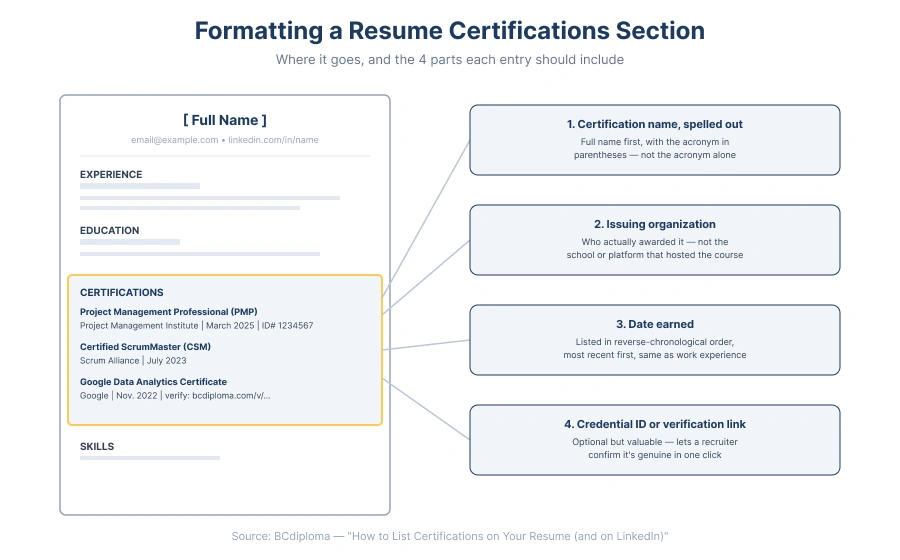
There’s a simple, consistent format recruiters expect: the certification’s full name (spelled out, with the acronym in parentheses if it has one), the organization that issued it, and the date you earned it. List certifications in reverse-chronological order — most recent first — the same way you’d order work experience. Spelling out the full name matters as much as the acronym itself: applicant tracking systems and recruiters skimming quickly may not recognize an acronym on its own, especially outside your specific industry.
- Certification name — written out in full, e.g. “Project Management Professional (PMP)”, not just the acronym
- Issuing organization — who actually awarded it
- Date earned — and an expiration date if the certification isn’t permanent
- Credential ID or verification link — if you have one, include it so it can be checked
Example: “Project Management Professional (PMP) — Project Management Institute, March 2025.” Separating each part with a vertical bar rather than a comma keeps the line easy to scan. If a certification is still in progress, say so explicitly — “CompTIA Security+ (in progress) — expected completion: June 2026” — rather than listing it as complete.
Where to put your certifications section
There are three real options, depending on how relevant the certification is to the specific role you’re applying for:
Default: after experience and education
For most resumes, certifications get their own section placed after Experience and Education — recruiters expect to see your work history and degree first, with certifications as supporting evidence.
Exception: when the role specifically requires it
If a certification is explicitly required for the role (a specific safety, compliance, or technical credential named in the job posting), mention it in your resume summary near the top as well, so it’s not missed by a recruiter skimming quickly or by an applicant tracking system scanning for that exact requirement.
Alternative: in the resume header, for one standout credential
A single, highly relevant certification can also go directly under your name in the resume header — some formats use this for one standout credential specifically — but that’s the exception, not the default; most certifications belong in their own dedicated section, not scattered across the page.
Any of these section headings work: “Certifications,” “Professional Certifications,” or “Licenses & Certifications” — the last one doubles as the exact name LinkedIn uses, which makes it easy to keep both consistent.
What to include in each entry
Four things separate a complete, credible certification entry from one that raises more questions than it answers:
| Element | Example | Why It Matters |
|---|---|---|
| Certification name | Project Management Professional (PMP) | Acronyms alone can get missed by both humans and applicant tracking systems |
| Issuing organization | Project Management Institute | Confirms who actually awarded it, not just who hosted the course |
| Date earned | March 2025 | Establishes how current it is; use expected-completion wording if still in progress |
| Credential ID or verification link | ID# 1234567, or a clickable verification URL | Lets a recruiter confirm it’s genuine without emailing you directly |
Certifications vs. certificates of completion: which belongs on a resume?
Both belong on a resume, but they carry different weight. A certification is awarded after passing a recognized exam, so recruiters read it as verified, tested knowledge. A certificate of completion documents that you finished a course or program — no exam required — which is still worth listing when it fills a real skills gap or shows initiative, just don’t present it with the same language you’d use for a passed exam.
A simple rule of thumb: if you had to demonstrate competency to get it, call it a certification. If you just had to show up and finish, call it what it is — a certificate of completion. Blurring the two on a resume is one of the fastest ways to lose credibility with a recruiter who already knows the difference.
How to add certifications on linkedIn
Certifications live in LinkedIn’s “Licenses & Certifications” section, under your profile’s Background information. When you add one, include the credential URL if you have it — that’s what turns the entry into a clickable “Show credential” button, letting anyone verify it without asking you directly. This matters whether the credential came from a formal, exam-based certification or a completion-based program: either way, a working verification link does more to establish trust than the name alone.
For the exact click-by-click steps — and the common mistakes to avoid — see our full walkthrough: how to add a certification on LinkedIn.
Why a verifiable certification carries more weight
A certification typed as a line of text — on a resume or a LinkedIn profile — asks the reader to take it on faith. A verifiable digital certificate removes that ambiguity: anyone can click through and confirm it’s genuine in one click, without emailing the issuer or waiting on a callback. That’s a meaningful difference for the recruiter reading it, and for you as the candidate — it’s the difference between asking to be believed and simply being confirmed.
This is the same verification model used across BCdiploma’s digital certificates, credentials, and diplomas more broadly — see real, verifiable examples in our portfolio of digital certificates.
Common mistakes to avoid
Five mistakes show up often enough to call out individually:
Listing only the acronym
“PMP, 2024” skips information both recruiters and applicant tracking systems may need to recognize what it actually is — spell it out at least once.
Including expired or irrelevant certifications
A certification that doesn’t support the role you’re applying for, or one you’ve let lapse without renewing, is better left off or clearly marked as expired. Not sure which certifications actually matter for your target role? O*NET OnLine, the U.S. Department of Labor’s occupational database, lets you look up the credentials most commonly associated with a specific job title.
Leaving out the issuing organization
A name and a date without who awarded it reads as incomplete, and gives a recruiter no way to judge how rigorous it actually was.
No way to verify it
A name and a date typed on a page asks the reader to take it on faith; a credential ID or verification link removes that friction entirely.
Burying a job-required certification
If the posting specifically asks for it, mention it in your summary near the top too — not just in the certifications section further down the page.
List verifiable credentials with BCdiploma
If you’re the one issuing certifications — not just adding them to a resume — BCdiploma lets you issue verifiable, blockchain-secured credentials your recipients can list on a resume or LinkedIn with a working verification link, not just a name they type in. See how organizations are already using BCdiploma in our customer success stories.
Frequently asked questions
Contact us for more information.
Give them their own section — “Certifications” or “Licenses & Certifications” — placed after Experience and Education. List the full certification name, the issuing organization, and the date earned, most recent first.
After, in almost every case. The exception is when a specific certification is required for the role — then mention it in your summary at the top too, in addition to the certifications section
No. A certificate of completion only requires finishing the program — attending the sessions, completing the modules, or meeting whatever completion criteria the issuer sets. Formal certifications are the ones that require passing a test.
Only if they’re still relevant to the role or show a skill you’ve maintained since. If a certification has a hard expiration and you haven’t renewed it, it’s usually better left off or clearly marked as expired rather than presented as current.
List it in the same section, but be accurate about what it proves. A certification implies you passed an exam; a certificate of completion means you finished a course or program — still worth including, just don’t blur the two.
Add them under “Licenses & Certifications” and include the credential URL if you have one — that’s what gives visitors a “Show credential” button so they can confirm it’s genuine without contacting you.
Yes — just say so explicitly, e.g. “CompTIA Security+ (in progress), expected completion: June 2026,” rather than listing it as already earned.