TL;DR: key takeaways
- Credential management software lets an organization issue credentials, track their status and expiry, renew, correct or revoke them, and let anyone verify them.
- It goes further than a certificate generator, which only creates documents, and it is not the IT “credential management” that stores passwords.
- The lifecycle has five stages: issue, track, renew, revoke or correct, and verify. Issuing and verification are standard; renewal, revocation and correction vary more between tools.
- Check five points before choosing: automation from your systems, expiry and status tracking, revocation, verification without an account, and open standards such as Open Badges 3.0.
Credential management software is software that lets an organization issue diplomas, certificates and badges, track their status and expiry, renew, correct or revoke them, and let employers verify them online. Universities, business schools, training providers and awarding bodies use it to replace spreadsheets, PDF files and email threads with one system that follows each credential from issuance to its last verification.
The volume explains why. Credential Engine counted 1,850,034 unique credentials offered by 134,491 providers in the US alone (Counting Credentials 2025). Each one has to be issued correctly, kept up to date and checked by someone, sometimes years later. This guide walks through each stage of that lifecycle and what to look for in a tool. To compare vendors directly, see our guide to the top digital credential platforms.
What is credential management software?
Credential management software is the system an issuing organization uses to run its credentials over time: it creates them from learner data, delivers them, records their status (valid, expired, suspended, revoked), and answers verification requests. The term is easy to confuse with three neighboring tools:
| Tool | What it does | Where it stops |
|---|---|---|
| Certificate generator | Designs and produces certificates, often as PDF files | No status after issuance: an expired or withdrawn PDF still looks valid |
| Learning management system (LMS) | Delivers courses and records completion | Often issues a basic certificate, without expiry, revocation or independent verification |
| Certification management software | Runs certification programs: exams, eligibility, recertification and continuing education | Strong on candidate management; some rely on another tool to issue verifiable credentials |
| Credential management software | Issues, tracks, renews, revokes and verifies the credentials themselves | Depends on your SIS or LMS for the learning data |
In IT, “credential management” also means storing passwords and access keys. That is a different market: this guide is about academic and professional credentials.
What are the stages of the credential lifecycle?
A credential can go through five stages, whether it is a degree, a training certificate or a digital badge:
- Issue: create the credential from your learner data and deliver it to the recipient.
- Track: follow its status, its expiry date and how recipients use it.
- Renew: reissue it when a certification has to be renewed, or extend its validity.
- Revoke or correct: withdraw it after an error or misconduct, or fix a misspelled name.
- Verify: let employers and other institutions confirm it is genuine, without calling you.
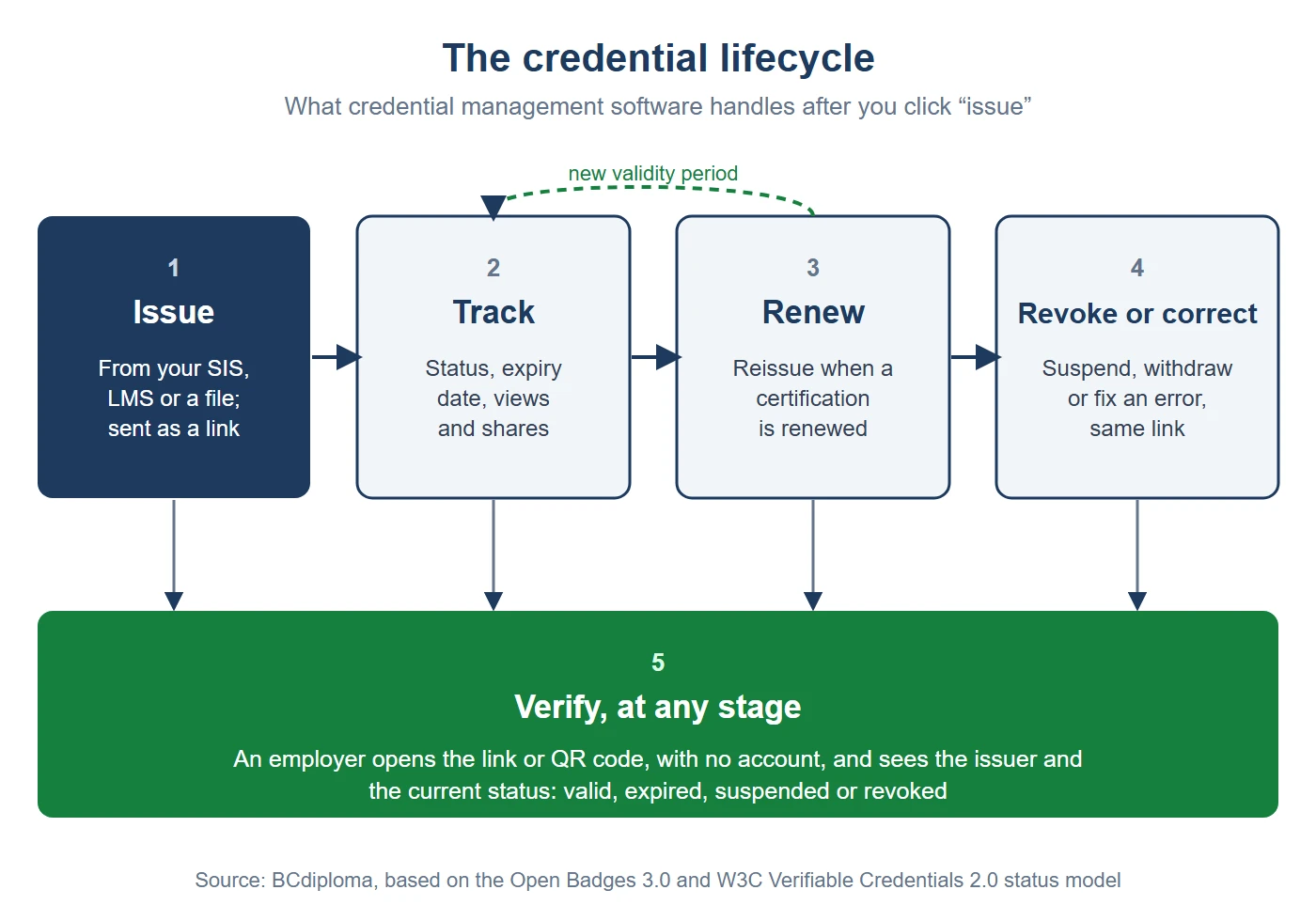
Issuing and verification are standard features. Renewal, revocation and correction vary more from one tool to another, and they matter as soon as you issue credentials that expire or carry legal weight.
How do you issue credentials at scale?
Issuing is where most of the time goes when it is done by hand: copying names into a template, exporting PDF files, emailing them one by one. A dedicated platform replaces this with three things:
- Data in, credentials out: import a spreadsheet of recipients, or connect your student information system (SIS), LMS or CRM so credentials are issued as soon as a learner meets the criteria.
- Your design and your brand: templates with your logo and colors, and ideally white-label credentials on your own domain, so the institution’s name is the one recipients and employers see.
- Delivery without friction: the recipient receives a link by email and opens the credential with no account to create. Each extra step is one more place where a recipient can give up before claiming the credential.
At the University of Lille, more than 80,000 bilingual degree certificates have been issued automatically from the student information system since 2021, about 20,000 a year (Lille white paper). BCdiploma imports recipients from an Excel file or through its API, which is available on all plans without usage caps, and connects to Moodle and Zapier, with connectors for Salesforce and other systems.
How do you track credentials after they are issued?
A credential is not finished once it is sent. Tracking answers three questions: is it still valid, did the recipient receive and use it, and can you prove what you issued during an audit? Buyers often search for this part as certification tracking software.
- Status and validity: each credential should carry a status (published, expired, suspended, revoked) and, when relevant, an expiry date. When the date passes, the status should change automatically.
- Recipient engagement: views, downloads and shares (for example, how many recipients added the credential to LinkedIn) show whether the credential has value for learners.
- Records and exports: you need to list what was issued, to whom and when, and export it for accreditation reviews or internal audits.
In BCdiploma, an expiration date can be set on every plan and the credential switches to “Expired” automatically. Credential analytics (views, downloads, LinkedIn adds and shares, email deliverability, revoked credentials) run in the institution’s own Google Analytics 4, Matomo, Tableau or Looker, and campaign reports can be exported to Excel.
How do you manage credential renewal and recertification?
Professional certifications, compliance training and many licenses are only valid for a fixed period. Managing credential renewal means three things: setting a validity period at issuance, knowing which credentials are about to expire, and issuing an updated credential once the holder meets the renewal conditions (new exam, continuing education credits, attendance).
This is where certification management software and credential management software meet. Awarding bodies often run eligibility and continuing education in one system and issue the renewed credential in another; what matters is that the old credential shows as expired and the new one is verifiable. AFNOR Certification, for example, controls validity periods and suspension for more than 15,000 certificates, with real-time status updates and productivity gains of 50% (AFNOR case study).
In practice: set the expiry date when you issue the credential, export your list of credentials with their expiry dates each month, contact holders whose credential expires within 60 days, and issue a new credential when they renew. The expired one stays on record; the new one carries the new dates.
How do you revoke or correct a credential?
Revocation is the stage most guides skip, yet it is part of what makes a credential trustworthy. If an issuer can’t withdraw a credential, a diploma awarded in error or a certification withdrawn for misconduct stays valid for anyone who checks it. A good platform offers three actions:
- Suspend: make a credential temporarily unavailable, for example during an investigation, and reactivate it later.
- Revoke: withdraw it permanently, one at a time or in batch, so verification shows it is no longer valid.
- Correct: fix a misspelled name or wrong email without changing the link the recipient already shared.
Open standards support this. The Open Badges 3.0 specification and the W3C Verifiable Credentials Data Model 2.0 both define a validity end date (validUntil) and a credentialStatus property that tells a verifier whether a credential is suspended or revoked. In BCdiploma, a credential can be suspended and reactivated, or revoked permanently (individually, in batch or through the API), and an issued credential can be corrected one at a time while keeping the same link.
How do employers verify a credential?
Verification is the reason credentials exist. The employer, another university or a regulator should be able to confirm in seconds, without contacting you, that the credential was issued by your institution, to that person, that it hasn’t been changed and that it is still valid.
- A link or QR code that opens the credential on a page showing the issuer and the current status.
- No account for the verifier: anyone with the link can check it.
- Proof that outlasts the vendor: a record anchored on a blockchain or a cryptographic signature that stays checkable if you change providers.
The UK’s official degree verification service, Hedd, reports more than 2 million verifications and more than 400 bogus institutions identified (Jisc). At Lille, BCdiploma credentials have been consulted and verified more than 206,000 times. Each credential’s blockchain proof can be checked from the credential page or with the online verifier. Learn more about what makes a digital certificate verifiable.
What should you look for in credential management software?
Use these questions to compare tools. A vendor that can’t answer them clearly is probably strong on issuing and weak on the rest of the lifecycle.
| Criterion | Question to ask |
|---|---|
| Automation | Can credentials be issued from our SIS, LMS or CRM without manual exports? Is there an API, and is it limited by plan? |
| Expiry and status | Can we set expiry dates? Does the status change automatically? Can we report on credentials about to expire? |
| Revocation and correction | Can we suspend, revoke and correct a credential? Does the verification page show the change? |
| Verification | Can anyone verify without an account? What happens to verification if we leave the vendor? |
| Standards | Is the platform certified for Open Badges 3.0 by 1EdTech? Does it follow W3C Verifiable Credentials? |
| Data protection | Where is the data hosted? How does the vendor handle the GDPR, FERPA and the right to be forgotten? |
| Branding | Do credentials, emails and verification pages carry our name and domain? |
| Analytics | Which metrics can we see, and can we use them in our own analytics tools? |
How do you move from spreadsheets to credential management software?
Many organizations start from a mix of spreadsheets, PDF templates and email. A move in four steps limits the risk:
- Map your credentials: list each type you issue, who issues it, how long it is valid and how often it is verified.
- Start with one high-volume credential: a degree, a common certificate or a recurring training, to prove the process.
- Connect your source of truth: link the SIS, LMS or CRM so data is entered once, then add expiry rules and revocation procedures.
- Tell verifiers: add the verification link to your registrar pages and tell employers and partners how to check credentials.
Results from BCdiploma customers show what changes: Montpellier Business School reduced staff time spent on certificates by 98%, from 110 hours to 2 hours (case study), and the University of Toronto School of Continuing Studies saved 170 workdays while issuing 6,000 micro-credentials (case study).
Why choose BCdiploma to manage your credentials?
BCdiploma covers the full credential lifecycle for universities, business schools, training providers and awarding bodies: issuance from Excel or your systems, expiry dates and automatic statuses, suspension, revocation and correction, and one-click verification with no account. Every credential is secured by a patented blockchain system, and the platform is certified for Open Badges 3.0 by 1EdTech.
Data is hosted in the EU by default or in the US on request, and issued credentials stay accessible and verifiable even if you end your subscription. More than 250 institutions use BCdiploma. See how it works for training providers, awarding bodies and higher education, or start a free trial.
Frequently asked questions
Contact us for more information.
Credential management software lets an organization issue diplomas, certificates and badges, track their status and expiry, renew, correct or revoke them, and let employers verify them online. It replaces spreadsheets, PDF files and email with one system that covers the whole credential lifecycle.
No. In IT, credential management means storing passwords, keys and access rights. Credential management software for education and training manages academic and professional credentials such as diplomas, certificates and badges.
Certification management software runs certification programs: exams, eligibility, continuing education and recertification. Credential management software issues and manages the credentials themselves, including expiry, revocation and verification. Awarding bodies often use both, or one platform that covers both.
Yes. The issuer can set an expiry date when the credential is issued. After that date, the credential shows as expired when someone verifies it. Open Badges 3.0 and W3C Verifiable Credentials both support a validity end date.
Yes, on most platforms. The issuer can suspend a credential temporarily or revoke it permanently, for example after an error or misconduct. Anyone who verifies it then sees that it is no longer valid.
It depends on the platform. Some require recipients to create an account before they can accept a credential; others, like BCdiploma, deliver a link that opens the credential with no account or login.
Pricing is usually per recipient, per credential or by subscription. Published prices start at a few dollars per recipient per year; enterprise and white-label plans are usually priced on quote. Check what happens to issued credentials if you stop paying.
